Getting Federated
I recently learned about a decentralized git forge called Tangled which made me curious to learn more about federation. I am vaguely familiar with the idea, but I don’t know how it actually works, so I looked it up and got to reading.
Apparently, Tangled is built on top of the Authenticated Transfer Protocol (AT Proto). It took me a few tries to get a passable understanding of how that works, so here’s what I learned:
- AT Proto splits the jobs of a normal application into separate services
- Decentralized ID (DID) is your permanent ID
- Handle points to your DID
- Public Ledger of Credentials (PLC) records your DID for others to find
- Personal Data Server (PDS) stores your personal data
- Relays monitor every PDS for changes and broadcasts the events
- AppViews subscribe to relays and keep an index of the data needed for the application
(Side note: an extra reason I wrote all of these down is because there are so many acronyms I couldn’t keep straight, and many resources just expect you to already know what they mean 🙄)
  flowchart BT
    did(["did:plc:… (you)"]) --> pds
    subgraph pds["Your PDS: one repo"]
      r["app.bsky.feed.post/…<br/>org.tangled.feed.star/…<br/>"]
    end
    pds --> relay[Relay]
    relay --> bsky["Bluesky<br/>reads app.bsky.*"]
    relay --> tngl["Tangled<br/>reads org.tangled.*"]
    relay --> leaf["Leaflet<br/>reads pub.leaflet.*"]
    bsky -. writes .-> pds
    leaf -. writes .-> pds
These are the main pieces to AT Proto, which gives you control over your data. That’s great! Any time I change something (like my profile picture) on Tangled, it updates my PDS, then gets notified of the change via the relay.
Controlling my data
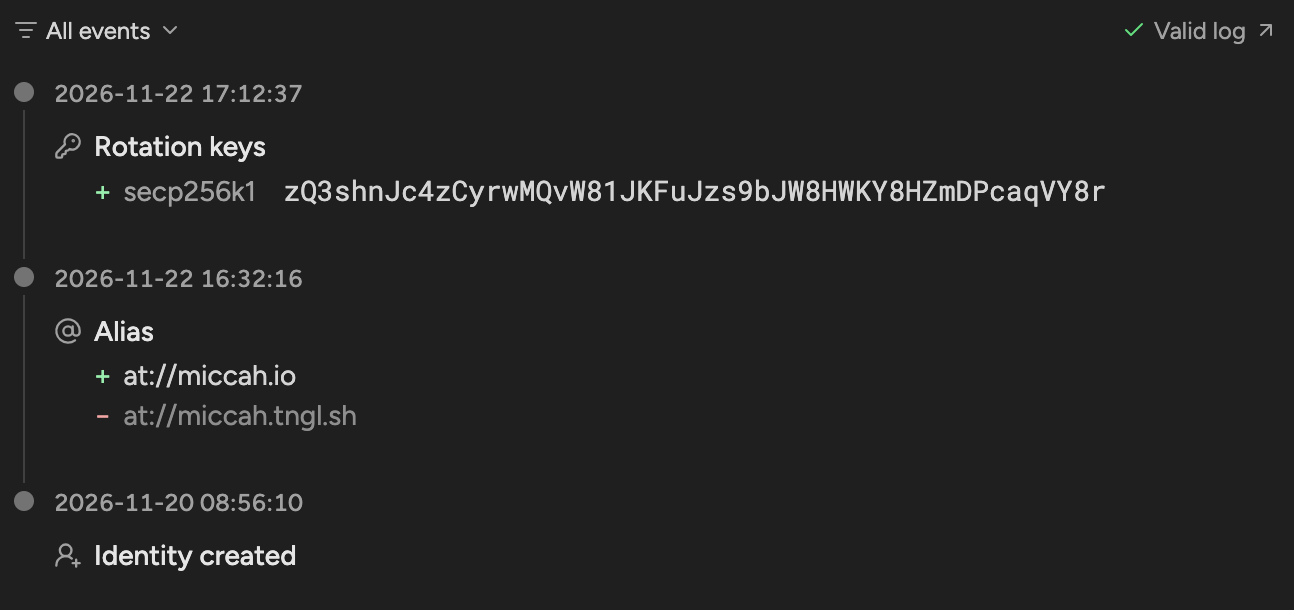
This is the first federated service I signed up for, so Tangled created a DID
for me, created a handle miccah.tngl.sh, and hosts my PDS. That’s cool and
super useful, but I wanted to feel more in control of my identity. My goal
is to change my handle to miccah.io and add my own private key to be able
to control changes to my DID document.
Updating my handle
- Add a DNS TXT record to my domain
_atproto.miccah.io "did=did:plc:wqu6y2v3a5reppa5uoywljlh" - Use goat to login to my PDS and update my handle on my behalf
# Get my tangled password from my password manager (since tangled is my PDS)
export GOAT_PASSWORD=$(bw get 'Tangled')
goat account login -u miccah.tngl.sh
goat account update-handle miccah.io
Alternatively, you can prove you own your handle by putting your DID on path
/.well-known/atproto-did.
Adding my own private key
The reason my PDS was able to change my handle was because it has a rotation key, which is authorized to make those changes. I wanted that power too.
- Generate a
secp256k1keygoat key generate -t k256 - Login and get a confirmation token from my PDS (this serves as 2FA
verification for requesting the change in the next step. Kind of interesting
that you can get the code before doing the operation)
export GOAT_PASSWORD=$(bw get 'Tangled') goat account login -u miccah.io goat account plc request-token - Add the key at the top of the list
# Make it the first key so it can override operations from other keys.
goat account plc add-rotation-key --first --token $TOKEN $PUBKEY
Checking my work
The neat part about all of this is that it’s all public data with a public record you can see here!